
Statistics
When you run several translation engines, it helps to know how each one is really doing. TransOne keeps track of two things for you:
- Which translation you pick. When several engines translate the same text, TransOne notices which result you chose, and ranks your engines by how often you choose them.
- How each engine performs. For every engine it counts the requests, how many succeeded, how long they took, and how many characters you sent.
This answers practical questions. If some of your engines cost money, which one is earning its keep? Which one keeps timing out? How much of your quota have you used this month? The rest you can turn off.
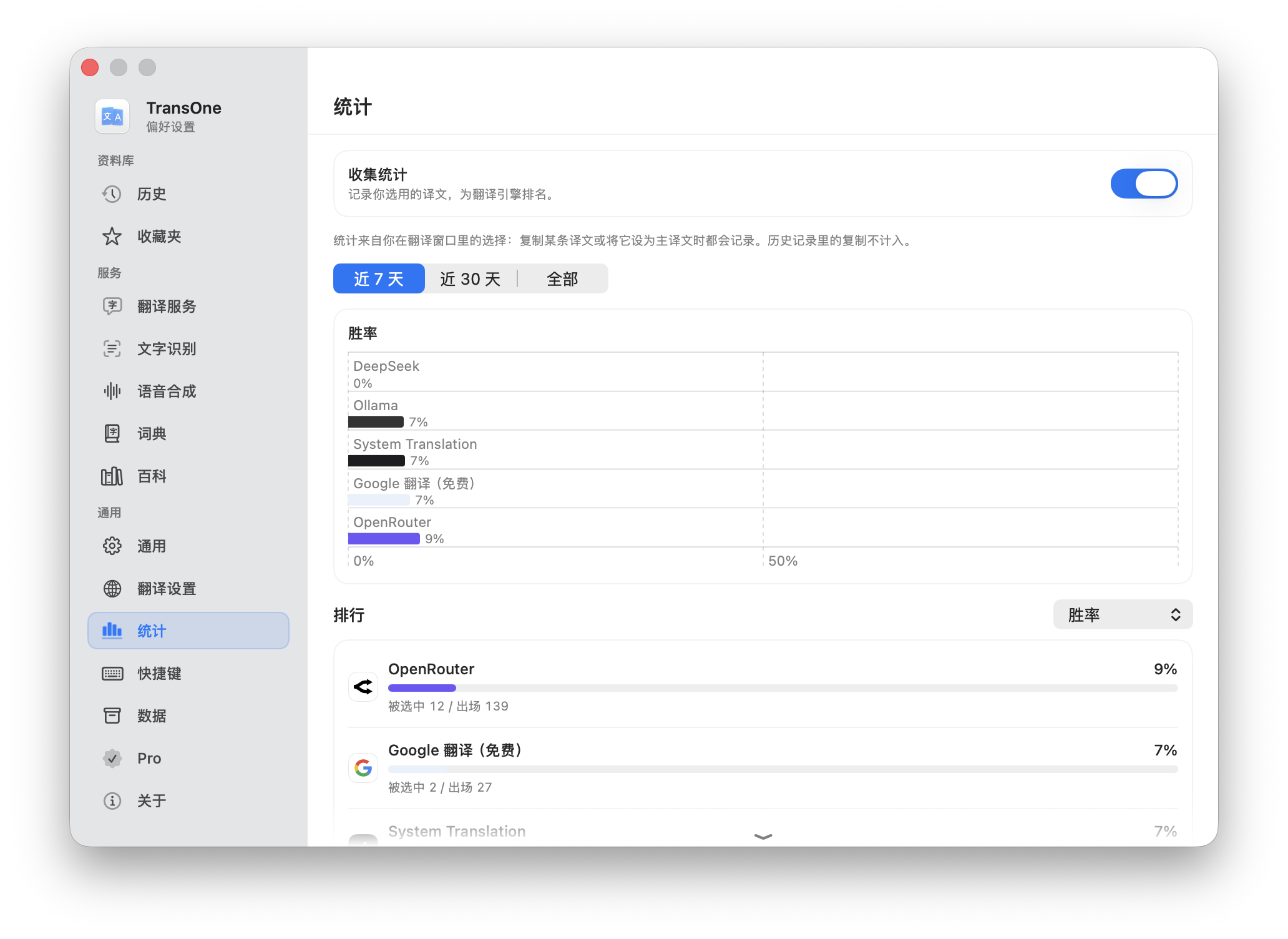
The Statistics page
Open Preferences from the menu bar icon and go to Settings ▸ Statistics. From top to bottom:
- Collect statistics: a switch, on by default. It tracks engine speed, reliability and usage, and which translations you pick.
- Time Range: Last 7 Days (the default), Last 30 Days or All Time.
- Four summary tiles:
- Requests, with how many failed;
- Success Rate, naming your most reliable engine;
- Avg. Response, naming your fastest engine;
- Characters, naming the engine you use most.
- Metric: what the chart and the table rank by. One of Win Rate, Success Rate, Response Time, Requests or Characters.
- A bar chart of each engine for the chosen metric, highest first (fastest first for Response Time).
- A table with all five metrics for every engine. Click a column header to rank by it. Under each engine, a line shows how often it was picked out of how often it appeared, and what kinds of failure it had, such as Timeout, Rate limited or Authentication.
The five metrics
| Metric | What it measures |
|---|---|
| Win Rate | How often you pick this engine when two or more engines translate the same text. |
| Success Rate | The share of requests that returned a translation. |
| Response Time | The average time from request to the full translation. |
| Requests | How many translation requests were sent to this engine. |
| Characters | How many source characters were sent. Useful for estimating your quota with a paid service. |
Requests are counted from every way of translating: the translation window, Silent Selection Translation, Image Translation and the study card. Polish and summaries are not counted.
A request that never really reached the engine does not count as a failure: a missing key, a translation you cancelled, or an on-device language pack that was still downloading.
What counts as a pick
TransOne only counts a pick when there was a real choice to make: at least two engines returned a result. If only one engine answered, there was nothing to compare.
Any of these counts as picking a translation:
- copying the main translation;
- making another engine's result the main one;
- copying a card in Compare mode;
- dragging a Compare card to the top.
Copying the source text does not count, and neither does copying an entry from your History.
Too few samples
An engine with fewer than 5 samples for the chosen metric is dimmed and marked Not enough data, because a couple of results is not enough to judge it fairly. For Win Rate that means 5 appearances; for Success Rate and Response Time, 5 requests. Keep using it and it will fill in.
Turn it off or clear it
- Clear Statistics… wipes the collected data but keeps recording going forward.
- Turning Collect statistics off deletes everything collected so far as well, not just future data, so TransOne asks you to confirm first.
WARNING
Restore Services to Defaults also clears your statistics, along with resetting your engines. Removing an engine removes its statistics too.
Privacy
All of this stays on your Mac. Nothing about which engines you use, or what you translate, is ever uploaded. See Privacy and your data.